
VSCode extension · real-time

Vulnerabilities, flagged
as you type.

The XYZ Vulnerability Scanner reads your dependency manifests the moment you edit them, and underlines the risky lines, before anything is ever installed. Across Java, JavaScript (npm), Python, Go and .NET (NuGet), powered by the same supply-chain brain that gates the proxy, now inside your editor.


VS Code JavaScript / npm Python / PyPI Go .NET / NuGet Java
15 "axios": "1.14.1" ⛔ blocked
axios@1.14.1 Block
94/100 XYZ risk · critical
  • threatSupply-chain attack · MAL-2025-1142
  • known exploitYes · weaponized
  • CVEsCVE-2025-30172 +2
  • downloads48M / week
  • dependents12,400 packages
  • campaignShai-Hulud cluster
via the XYZ decision brain · ~80 ms verdict

fig. 01 · hover a flagged dependency

What it does

The verdict, inline,
where you write code.

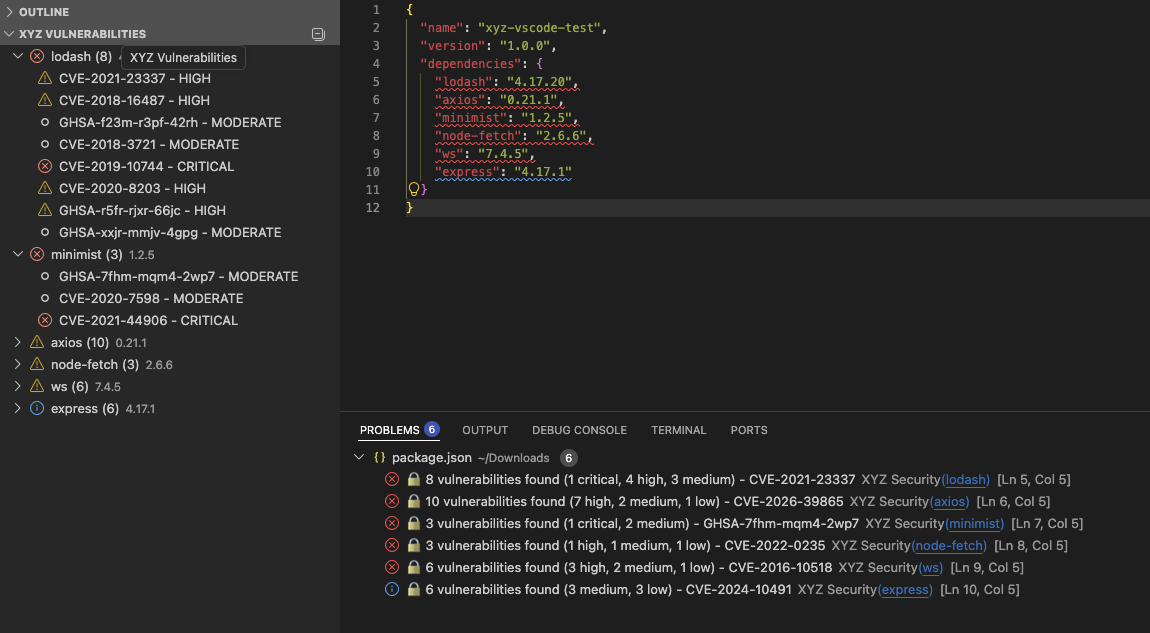
Same diagnostics in the editor and the terminal: the extension flags risky dependencies on every save, and the xyz CLI gives the identical verdict, terminal-native. One brain, two surfaces.
Java JavaScript / npm Python / PyPI Go .NET / NuGet
5 ecosystems
fig. 02 / inline diagnostics on every dependency
package.json · my-app
Inline vulnerability warnings on package.json dependencies in the XYZ VSCode extension
Hover for the full story

One hover. The entire
risk profile.

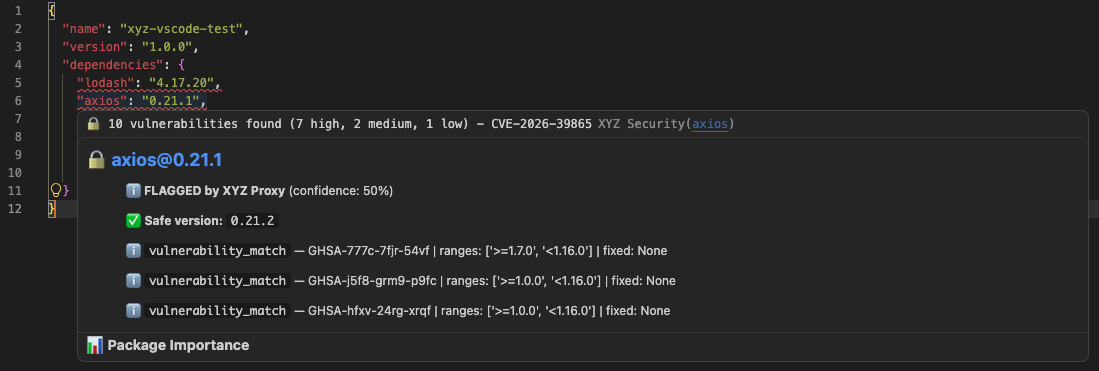
Hover a flagged dependency and the extension surfaces the XYZ score, severity, CVEs, exploit status and any active campaign, the same brain that gates the proxy.
package.json · my-app
XYZ hover card showing risk score, severity, CVEs and exploit status for a flagged dependency in VSCode

fig. 03 · hover card (live in the editor)

Severity at a glance

Color tells you
how fast to move.

Criticalblock · do not install
Highquarantine · review now
Mediumalert · plan a fix
Lowinformational
Get started

Installed in
under a minute.

VS Code 1

Install the extension

Open Extensions (⌘⇧X) and search "XYZ Vulnerability Scanner", or install from the Marketplace.

Open in Marketplace →
2

Add your API key

Run XYZ: Configure API Key from the command palette. Grab a free key at app.cyberxyz.io.

>XYZ: Configure API Key
3

Open a project

Open any repo with a package.json. Scanning starts automatically, results show inline and in the status bar.

// the ask

Catch it in the editor,
not in production.

See the extension and the full platform in a 15-minute walkthrough. We'll wire it into your team's editors and CI.

  • Free API key
  • Java · JS · Python · Go · .NET
  • Same brain as the proxy

Thanks! We'll be in touch.

Check your inbox. We'll reach out within 24 hours.

Get a demo

We'll respond within 24 hours. No spam, ever.